Workstation Options
We offer multiple approaches to how our team accesses your environment. Each option balances security, productivity, and operational overhead differently.
Quick Comparison
| Option | Security Control | Developer Experience | Time to Start | Client Burden |
|---|---|---|---|---|
| Azure Virtual Desktop | Maximum isolation | Limited (latency, tooling constraints) | 1-2 weeks | Moderate (Azure setup) |
| Client-Provided Laptops | Full client control | Good | 2-4 weeks | High (procurement, shipping) |
| Soal-Provided Laptops | High (MDM-managed) | Best | 1 week | Low |
Option 1: Azure Virtual Desktop
Our team works entirely within virtual machines hosted in your Azure environment. No client data ever touches a local device.
How It Works
- Client provisions Azure Virtual Desktop (AVD) instances
- Soal engineers connect via Microsoft Remote Desktop, authenticated through Azure AD with MFA
- All work occurs within the VM, and code, data, and documents never leave the virtual environment
- Connection is established over HTTPS tunnel; RDP session initiates only after authentication
Security Controls
- Network Isolation: VMs reside in a private network with no inbound internet access
- Data Exfiltration Prevention: USB disabled, clipboard disabled, file download blocked, email (port 25) blocked, screen capture disabled
- Endpoint Protection: Microsoft Defender for Endpoint on each VM
- Monitoring: Azure Monitor and Azure Sentinel for real-time logging and alerting
- Patch Management: Azure Update Management for automated OS and application patching
- VPN: Site-to-site VPN with AES-256 encryption for network communication
Advantages
- Maximum data isolation. Nothing leaves your cloud
- Easy access revocation (delete the VM)
- Full audit trail within Azure
- No hardware logistics
Tradeoffs
- Developer experience: Latency affects responsiveness; local IDE plugins and tooling don’t work
- Cost: Azure compute costs for running VMs during work hours
- Setup time: Requires Azure configuration, VPN setup, and provisioning
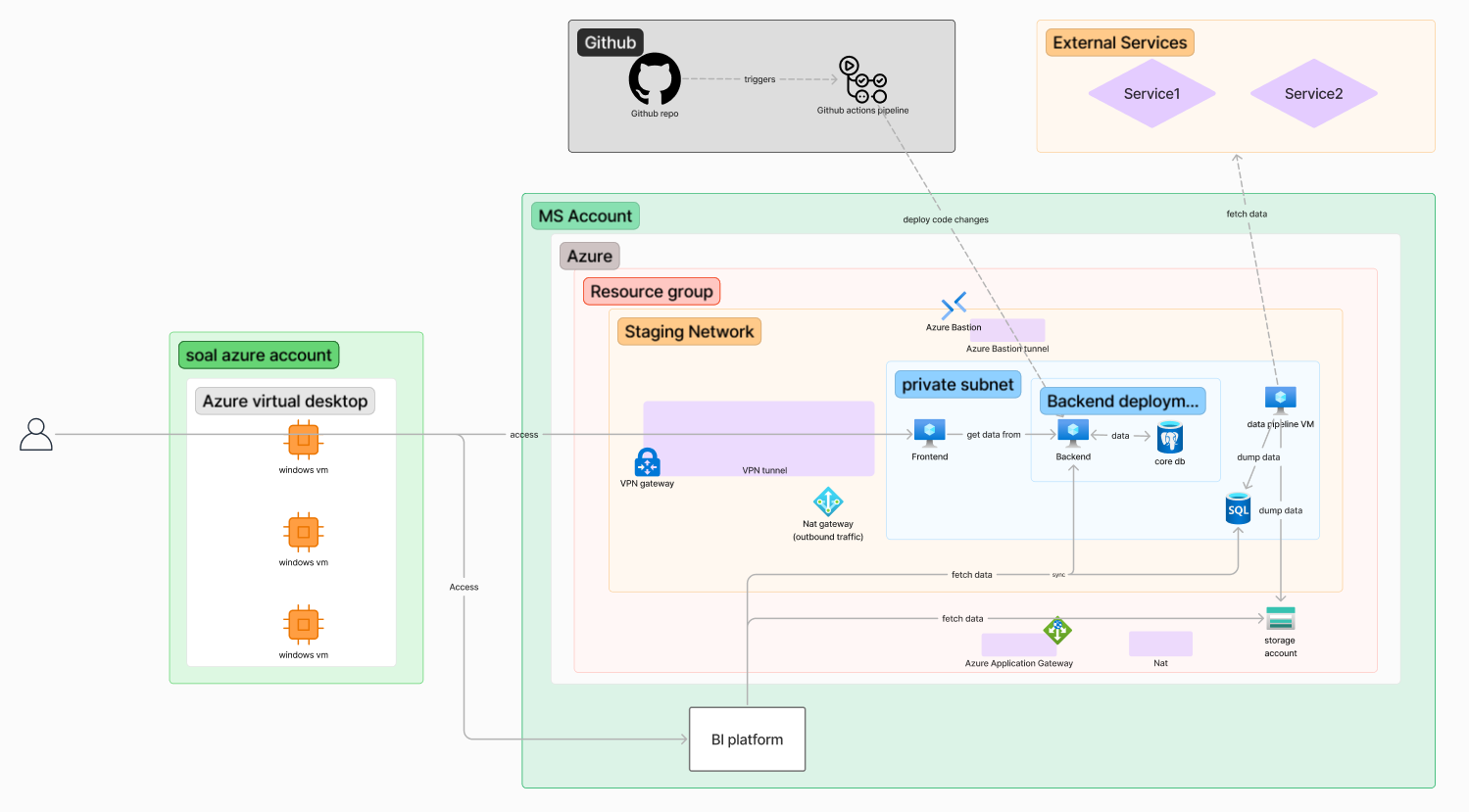 Azure Virtual Desktop connects to client infrastructure through a secure VPN tunnel. Engineers work within isolated VMs while accessing client resources in private subnets.
Option 2: Client-Provided Laptops
Your organization provides hardware directly to our team members. You maintain full control over the device configuration and security posture.
How It Works
- Client procures and configures laptops according to internal IT policies
- Laptops are shipped to Soal team members
- All security controls, MDM, and monitoring are managed by client IT
- At project end, laptops are wiped and returned
Security Controls
Entirely determined by your organization:
- Your EDR/AV solution
- Your MDM policies
- Your patch management
- Your monitoring and logging
- Your encryption requirements
Advantages
- Full visibility and control for your security team
- Devices meet your exact compliance requirements
- No trust required in third-party device management
- Familiar to your IT team
Tradeoffs
- Procurement time: 2-4 weeks typical, longer if inventory is low
- Setup time / DevEx: Need to download our tools, work in Windows (Mac Preferred)
- Logistics: Shipping, tracking, returns
- Cost: Hardware and licensing borne by client
- Support burden: Your IT supports the devices
Option 3: Soal-Provided Laptops
Each Soal engineer receives a company-owned laptop when they join. These devices are centrally managed with enterprise security controls.
How It Works
- Soal issues laptops to team members upon hiring
- Devices are enrolled in our MDM (JumpCloud) and monitored
- For your engagement, we configure project-specific access controls
- At project end, all client data is securely wiped
Security Controls
- Device Management: JumpCloud MDM with compliance verification
- Endpoint Protection: SentinelOne EDR (or Defender/CrowdStrike per client preference)
- Disk Encryption: FileVault (macOS) or BitLocker (Windows), FIPS 140-3 compliant
- VPN: Required for any client network access
- MFA: Hardware security keys (FIDO2) for all authentication
- Removable Media: USB storage blocked
- Patch Management: Automated via MDM, max 3-day deferral
Advantages
- Devices are already provisioned and secured, enabling fast onboarding
- Consistent security baseline across all engagements
- No hardware procurement burden on client
- Good developer experience with local tooling
Tradeoffs
- Client has less direct visibility (we provide audit logs on request)
Monitoring & Privacy
We take a control-first, privacy-respecting approach to monitoring. Our goal is to prevent data exfiltration and enforce security policy without relying on invasive or employee-level surveillance.
What We Monitor
Monitoring is focused on systems and access, not individuals:
- Authentication events (logins, MFA challenges, access attempts)
- Device posture and compliance (encryption status, OS version, EDR health)
- Network activity metadata (destination domains, protocol usage)
- Security events and alerts (malware detections, policy violations)
- Access revocation and device wipe actions
Choosing an Option
For most engagements, Soal-Provided Laptops offer the best balance of security and efficiency. If your security policy requires direct device control or maximum isolation, we’re prepared to work with Azure Virtual Desktop or client-provided hardware.
Technical Specifications
Minimum Hardware (Client-Provided)
- Intel i7 or equivalent (Mac M2+ preferred)
- 32+ GB RAM
- 512+ GB SSD
- Windows 11 Pro or macOS (latest supported version)
Soal-Issued Laptop Specs
- MacBook Pro M2+ Pro/Max
- Latest macOS
- Full disk encryption enabled
- JumpCloud MDM enrolled
- SentinelOne EDR installed
Software Requirements (All Options)
- Modern browser (Chrome, Edge, Safari)
- Terminal access with admin rights (WSL for development)
- Docker
- Git
- IDE of engineer’s choice (VS Code, JetBrains, Cursor, Codex, Claude Code etc.)
- VPN client (provided by Soal or client)
- Other SaaS Apps (Figma / Notion / Linear / 1password)
- Microsoft Suite